

AlexHH25
Experienced
- Joined
- Oct 20, 2012
- Messages
- 463
- Reaction score
- 246
Ok, Some people have been struggling with our teamspeak at the moment.
So here is a guide for Navigating On Teamspeak.
Once you download teamspeak and set it up you then need to connect to us!
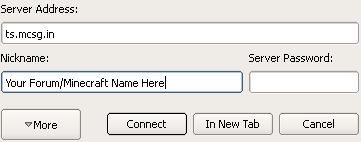
To do this you click "Connections" --> "Connect" --> Enter ts.mcsg.in and your name --> Connect!
If you struggle with this here are some step by step images:


Then you will appear here:
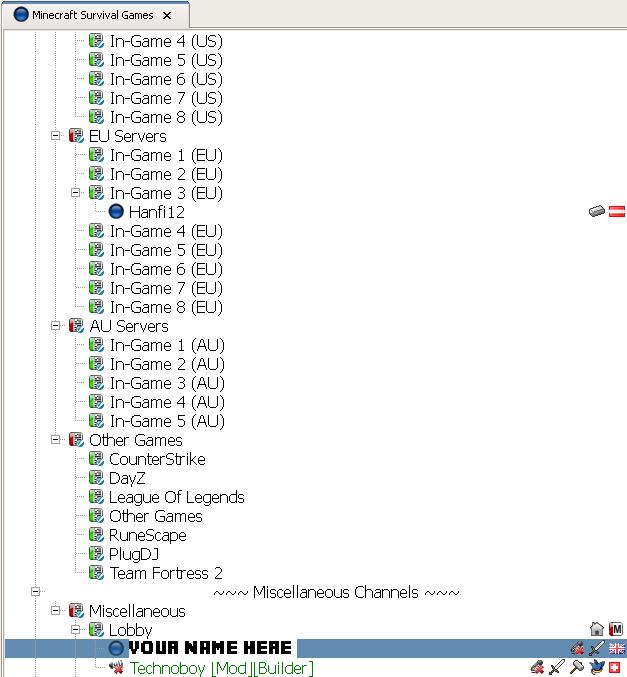
Then to move channel double click on the channel name! Make sure you double click!
So thats your small guide to navigating on teamspeak. If you need any help PM me!
So here is a guide for Navigating On Teamspeak.
Once you download teamspeak and set it up you then need to connect to us!
To do this you click "Connections" --> "Connect" --> Enter ts.mcsg.in and your name --> Connect!
If you struggle with this here are some step by step images:
Then you will appear here:
Then to move channel double click on the channel name! Make sure you double click!
So thats your small guide to navigating on teamspeak. If you need any help PM me!
Attachments
-
 61.8 KB Views: 40


